
AI Ticket Classification Without Historical Ticket Data: A Privacy-First Training Guide
Learn how AI ticket classification can be trained from QueueSpec metadata instead of historical tickets, keeping production data on-premise.

Most teams assume AI ticket classification starts with exporting thousands of old tickets. For privacy-conscious service desks, that is often the blocker: historical tickets contain personal data, customer identifiers, internal incidents, contracts, health details, or security-sensitive system names.
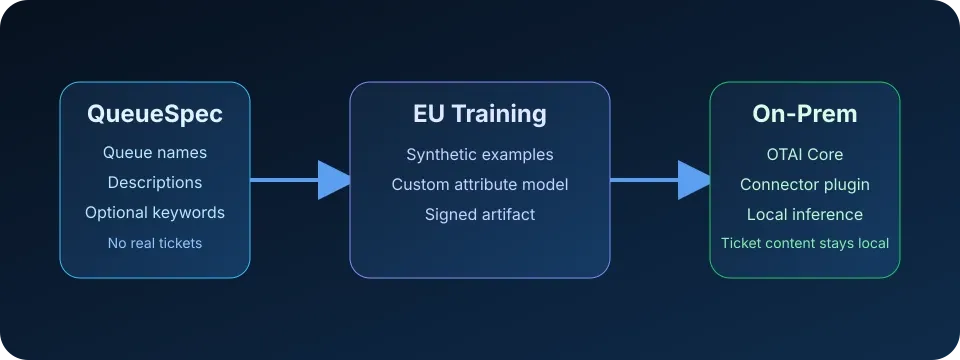
OTAI takes a different route. A custom model can be trained from QueueSpec metadata: queue names, descriptions, optional keywords, and self-written examples. Production ticket content stays on-premise, while the model learns the structure of the customer’s routing decisions.
Why Historical Ticket Exports Are Hard to Approve
Historical ticket data is operationally useful, but it is also difficult to move outside the organization. Even when a support team is willing to export data, security and compliance teams may ask:
- Which tickets contain personal data?
- Are attachments included?
- Can internal incidents or customer names be removed reliably?
- Where will the training data be processed?
- How long will the data be retained?
- Who can access the raw dataset?
Those questions are reasonable. Ticket archives are rarely clean training corpora. They are a mixture of customer messages, agent notes, forwarded emails, screenshots, logs, credentials that should not have been pasted, and business context that was never meant to leave the ticket system.
That is why a privacy-first AI rollout should start by asking whether historical tickets are truly required.
The QueueSpec Alternative
A QueueSpec describes the target labels the model should predict. Instead of sending real tickets to a training service, the customer provides metadata about the categories that already exist in the ticket system.
At minimum, a QueueSpec includes:
| Field | Purpose |
|---|---|
queue_id | Stable technical identifier for the queue, group, category, or custom field value |
queue_name | Human-readable label used by support teams |
description | Clear 2-5 sentence explanation of what belongs in this queue |
Optional fields can improve the model:
keywords_includekeywords_exclude- self-written example subjects
- language per queue
- constraints such as “exactly one queue” or “maximum one priority”
The important distinction is that these inputs describe the routing logic, not the real ticket archive. They are metadata about the support model.
How QueueSpec-Based Training Works
The OTAI training flow separates model creation from production inference.
-
Define the target attribute
Choose what the model should predict: queue, group, priority, affected product, category, assigned team, or another constrained field. -
Write clear QueueSpec descriptions
Each value needs a useful explanation. “Hardware” is weak. “Requests and incidents involving laptops, monitors, keyboards, docking stations, printers, and replacement devices” is stronger. -
Generate synthetic training data
OTAI’s EU-hosted training service uses the QueueSpec to generate varied synthetic examples for each target value. -
Train a custom model artifact
The output is a customer-specific model artifact for the defined attribute. -
Deploy on-premise
OTAI Runtime loads the model in the customer environment. New production tickets are classified locally through the relevant connector plugin.
This design keeps production ticket inference on-premise while allowing managed training to work from metadata.
What Can Be Classified Without Historical Tickets?
QueueSpec-based training works best for fields with a finite set of allowed values.
| Attribute | Example values | Good fit? |
|---|---|---|
| Queue or group | IT Helpdesk, Finance, HR, Facilities | Strong |
| Priority | Low, Normal, High, Critical | Strong when definitions are clear |
| Category | Access request, Hardware, Billing, Complaint | Strong |
| Affected product | Portal, Mobile App, ERP, Email | Strong |
| Assigned team | 1st Level, Network, Application Support | Strong |
| Free-form answer text | Full reply draft | Not the primary use case |
For multi-select fields, the design needs more care because combinations grow quickly. OTAI’s product strategy treats small constrained multi-select sets as possible, but single-select attributes such as queue routing are the cleaner starting point.
What Makes a Good QueueSpec?
The quality of the QueueSpec matters. A model can only learn distinctions that are written down clearly.
Good descriptions are specific
Weak:
Software issues.
Stronger:
Tickets about installing, updating, licensing, or troubleshooting standard workplace applications such as office tools, browsers, VPN clients, and endpoint security software. Excludes account lockouts and hardware replacement requests.
Good descriptions include boundaries
If two queues are often confused, the QueueSpec should explain the difference. For example:
- “Billing” includes invoices, payment status, and credit notes.
- “Contract” includes plan changes, term questions, and cancellation requests.
- Refund disputes should go to Billing unless the request is about terminating a contract.
Good descriptions use the customer’s language
Queue names often contain internal shorthand. The description should expand it into the words users actually write in tickets. That helps the model connect real-world phrasing to operational categories without using real ticket content during training.
Privacy Model: What Leaves and What Stays
The privacy boundary is simple:
| Data | Where it goes |
|---|---|
| Queue names and descriptions | EU-hosted training service |
| Optional self-written examples | EU-hosted training service |
| Synthetic training data | Generated during training |
| Model artifact | Returned to customer environment |
| Production ticket content | Stays on-premise during inference |
| Connector configuration and audit trail | Stays in the customer environment |
This is different from sending every incoming ticket to an external LLM provider. It is also different from hosting a large general-purpose LLM locally for every AI task. OTAI’s approach focuses on small, custom models for structured predictions such as queue routing.
For teams comparing deployment models, the Zammad 7 on-premise AI guide explains the trade-off between external AI providers, local LLMs, and specialized on-prem models.
When Historical Tickets Still Help
Avoiding historical exports does not mean historical tickets are useless. They can still help later, especially for evaluation and refinement inside the customer’s environment.
Examples:
- sample a small set locally to review ambiguous queues
- compare AI predictions against existing labels on-premise
- identify queues with overlapping definitions
- recommend retraining when routing patterns drift
The key is sequencing. You can start with QueueSpec metadata, deploy an on-prem model, and then use local evidence for monitoring without sending the raw archive to a cloud service.
A Practical Rollout Plan
For a privacy-first service desk, the first rollout should stay narrow.
-
Choose one high-volume attribute
Queue routing is usually the best starting point because every ticket needs a queue and misrouting creates visible delay. -
Limit the first model to clear values
Start with queues that agents already understand. Avoid edge-case categories until the main routing flow works. -
Write QueueSpec descriptions with support leads
The best descriptions come from people who know why tickets are moved between queues. -
Deploy with confidence thresholds
Low-confidence tickets should go to a triage or review path instead of being forced into the wrong queue. -
Review misses and refine descriptions
If the model confuses two queues, improve the QueueSpec boundary and retrain.
Where This Fits in the OTAI Website
If you are still choosing the ticket system layer, start with the open-source AI ticket system comparison. If you already run a specific platform, the system guides explain how automation fits into Zammad, OTOBO, and Znuny.
For product-level details, see Open Ticket AI for Zammad, Open Ticket AI for OTOBO, or Open Ticket AI for Znuny.
Conclusion
AI ticket classification does not have to begin with a risky historical ticket export. For structured predictions such as queue routing, a well-written QueueSpec can describe the customer’s target labels clearly enough to train a custom model while keeping production data on-premise.
That changes the adoption conversation. Instead of asking security teams to approve a large data transfer, support teams can start with the metadata they already own: queues, categories, priorities, and the operational knowledge behind them.