
Best Ollama Model for Zammad AI: On-Premise LLM Guide [2026]
Which Ollama model works best for Zammad 7 AI? A practical, on-premise model guide — the structured-output gotcha, real speed numbers, VRAM sizing, and which local LLM to pick for summaries, title rewriting, and classification.
![Best Ollama Model for Zammad AI: On-Premise LLM Guide [2026]](/_astro/zammad-ai-hero.C0UUzIJ2_Z1Ji4BW.avif)
📖 9 minute read • Updated June 23, 2026
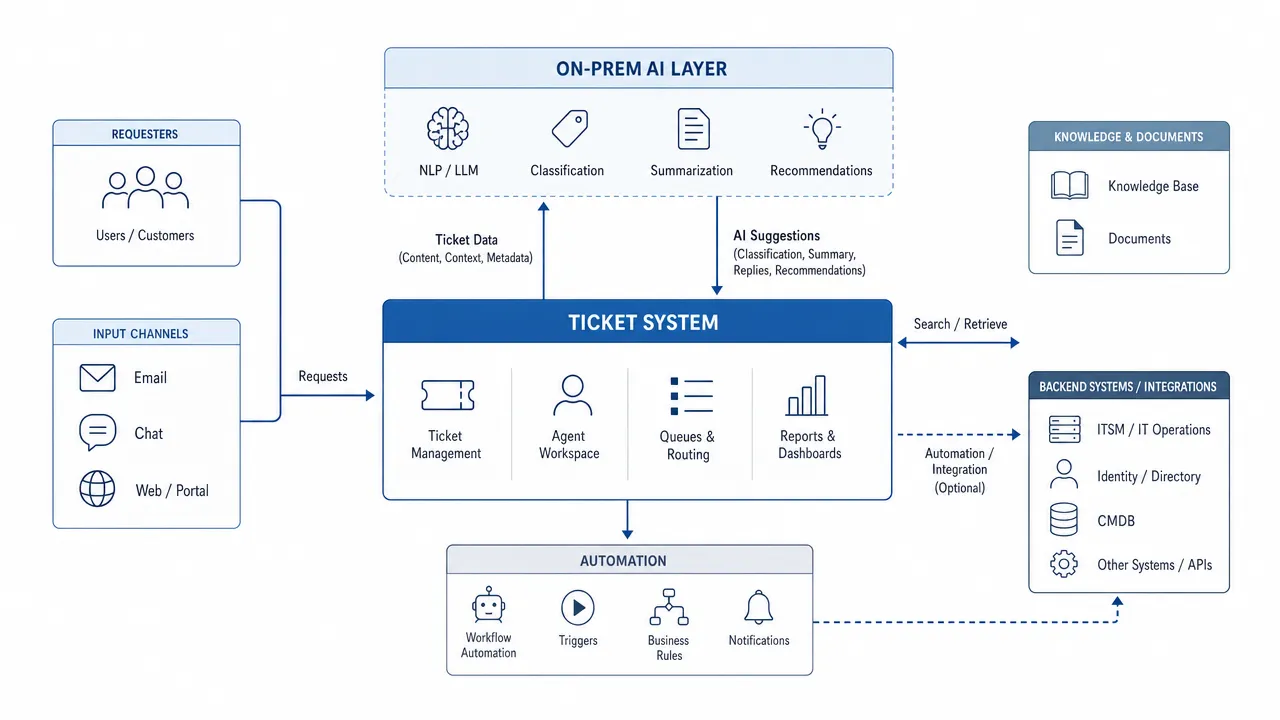
You upgraded to Zammad 7, switched on the AI features, pointed them at the Ollama box you already had running — and the ticket summaries came back empty, malformed, or simply never appeared. You see GPU load, you sometimes see a response, but Zammad cannot use it.
You are not doing anything wrong. The model you picked is the problem. Zammad’s AI features ask the LLM for a strict JSON structure, and a surprising number of popular models — including some very large ones — cannot reliably produce it. This guide answers the question Zammad admins keep asking on the community forum: which Ollama model actually works best for Zammad AI, and how to size the hardware behind it.
Setting up the rest of the stack? Pair this with our Zammad 7 on-premise setup guide and the full Zammad 7 AI features guide.
The real problem: structured output, not “intelligence”
The instinct is to reach for the biggest, smartest model you can run. For Zammad AI that instinct backfires. Zammad’s AI tasks — ticket summary, title rewriting, categorization — are structured-output jobs: the model must return valid JSON in a fixed schema. Three failure modes dominate:
- Broken JSON. Some models cannot honor the OpenAI-style structured-output contract.
gpt-oss(both the 20B and 120B variants) is a well-documented example — it returns prose or truncated fragments where Zammad expects JSON, so the feature silently fails. This is a known Ollama/gpt-ossissue, confirmed by Zammad’s core team on the community thread. - “Thinking” / reasoning models that return empty. Reasoning models (the Qwen3 family and similar) often have thinking enabled by default. With thinking on, the structured response can come back empty. Newer Zammad releases disable thinking automatically, but if you are on an older point release you must turn reasoning off yourself.
- Too big for the GPU. A 120B model on a weak GPU does not “run slowly” in a benign way — it times out. One operator running
qwen32bon a cluster of three Tesla P40s reported ~30% of requests failing on timeouts. Zammad’s AI calls have to return promptly to be useful inside the agent UI.
So the winning model is not the largest — it is the one that reliably emits JSON, fits your VRAM, and answers in seconds.
Which Ollama models actually work for Zammad AI
The table below distills what Zammad operators and the core team have reported in production, plus the structured-output and hardware constraints above. Speeds are indicative for a single ticket summary and scale with ticket length and GPU.
| Model | Approx. VRAM | Speed (1 summary) | JSON reliability | Best for | Verdict |
|---|---|---|---|---|---|
llama3.2:3b | ~4–6 GB | ~6 s | Good | Fast summaries, small GPUs | Zammad’s pre-filled default. Quick and dependable; quality is basic. Best starting point. |
gemma3 (4B) | ~8 GB | ~6–10 s | Good | Title rewriting on tiny GPUs | Runs in 8 GB VRAM; reported better titles than llama3.2. Strong budget pick. |
mistral-small3.2:24b | ~16–24 GB | ~15 s | Very good | Best overall quality | Operator-favorite: noticeably better summaries and much better title rewriting. Best quality/speed balance. |
qwen3.6-35b-a3b (35B/3B active) | ~20–24 GB | ~10–18 s | Good (thinking OFF) | Top quality, small footprint | MoE with only 3B active parameters — rivals dense 27–31B models per Qwen, yet fits in 24 GB. Strong pick on an RTX PRO 4000 Blackwell. Disable thinking. |
gemma3:27b (Google) | ~16–20 GB | ~12–18 s | Very good | High quality, good titles | LMArena Elo 1338 — beats DeepSeek-V3 and o3-mini. Proof the vendor (Google) is irrelevant; locally it is just as private. |
qwen3 family (thinking OFF) | varies | medium | Good with thinking off | Multilingual summaries | Solid once reasoning is disabled. With thinking on: slow, times out, or empty. |
gemma-4-e2b / gemma-4-e4b | ~6–10 GB | fast | Good | Efficient summaries | ~95% of the detail of much larger models at a fraction of the footprint. |
llama4:latest | large | ~31 s | Inconsistent | — | Slow and unreliable in testing. Skip for now. |
gpt-oss:20b / gpt-oss:120b | very large | — | Broken | — | Structured output fails. Do not use with Zammad AI today. |
The short answer
- Just want it to work on a modest GPU? Start with
llama3.2:3b(the default) orgemma3. - Have ~24 GB of VRAM (e.g. an RTX PRO 4000 Blackwell) and want the best results? Use
mistral-small3.2:24b,qwen3.6-35b-a3b(thinking off), orgemma3:27b— practically tied on quality. - Running a reasoning model (Qwen3)? Disable thinking or summaries will break.
- Avoid
gpt-oss(JSON) and oversized models on undersized GPUs (timeouts).
What the official benchmarks actually say
Many teams assume they have to use Mistral. The official benchmarks tell a different story: open-weight models from Alibaba (Qwen), Google (Gemma), and Mistral sit in the same league. The figures below come from Qwen’s official comparison — same test setup across all models:
| Model (vendor) | MMLU-Pro | MMLU-Redux | GPQA | AIME 2026 |
|---|---|---|---|---|
| Qwen3.6-35B-A3B — 35B/3B active (Alibaba) | 85.2 | 93.3 | 86.0 | 92.7 |
| Qwen3.5-27B — dense (Alibaba) | 86.1 | 93.2 | 85.5 | 92.6 |
| Gemma 4-31B (Google) | 85.2 | 93.7 | 84.3 | 89.2 |
| Gemma 4-26B-A4B (Google) | 82.6 | 92.7 | 82.3 | 88.3 |
Source: official Qwen3.6-35B-A3B benchmarks (2026-04-14). Higher is better; all values in %.
Two more documented data points:
- Gemma 3 27B (Google) scores an Elo of 1338 on the LMArena leaderboard, beating DeepSeek-V3 (1318) and o3-mini (1304) — at a fraction of the GPU footprint (source: Google – Gemma 3).
- Mistral Small 3.2 24B raises instruction-following to 84.78% (from 82.75% in 3.1) and produces more stable output — exactly what matters for clean JSON (source: Mistral / Hugging Face).
Important caveat: these are general knowledge, reasoning, and coding benchmarks — not a Zammad measurement. For Zammad, the deciding factors remain reliable JSON and latency on your GPU, not the leaderboard rank. But the table makes one thing clear: on raw model quality you do not have to commit to a single vendor.
The model’s vendor doesn’t matter
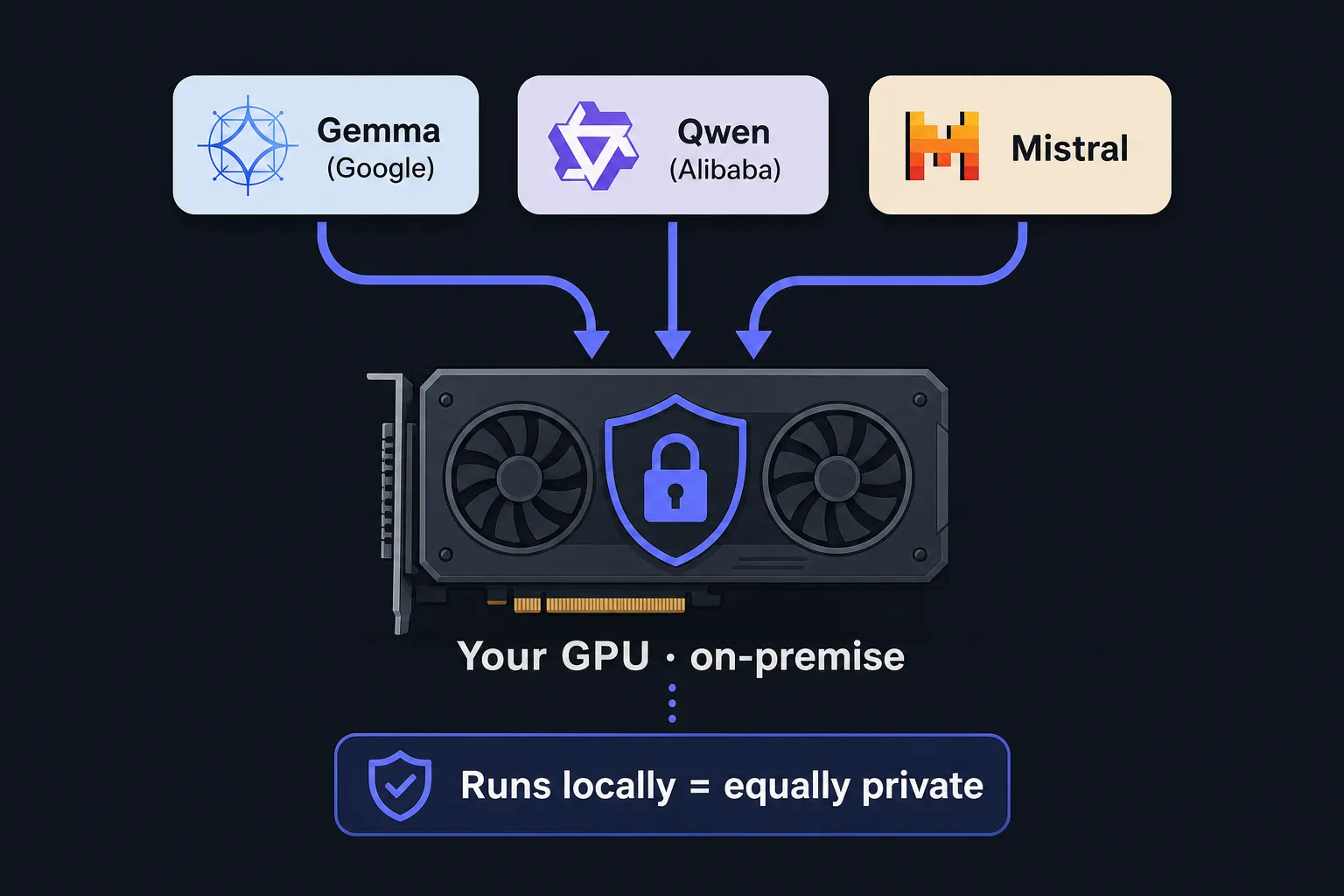
A common myth: “for data protection we must use Mistral, it’s European.” With open-weight models that is simply not true. You download the model file and run it on your hardware via Ollama. Whether it comes from Google (Gemma), Alibaba (Qwen), Mistral (France), or Meta (Llama) changes nothing about this:
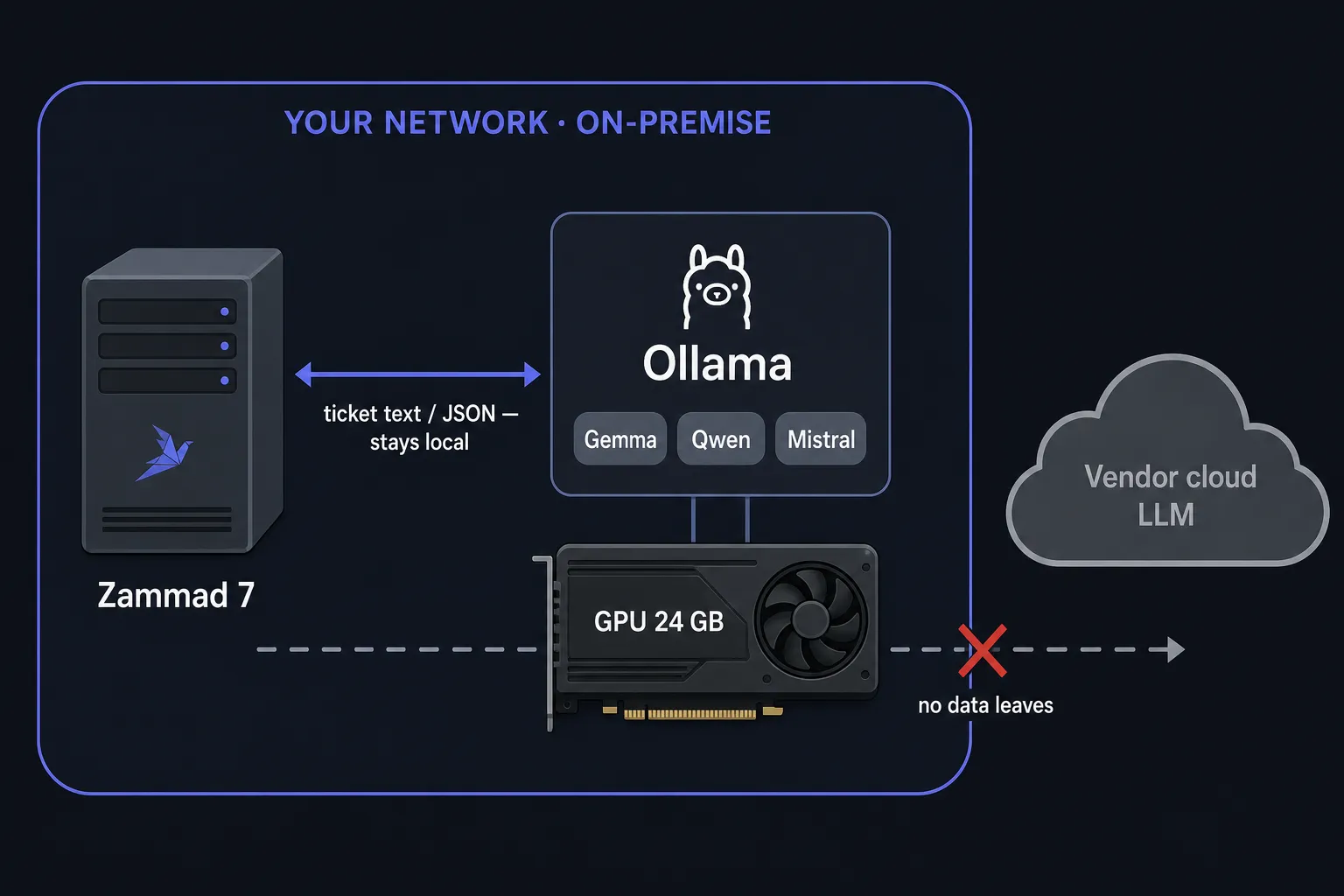
- Not a byte leaves the building. Open weights do not “call home.” The request goes to your local Ollama host and the answer comes back from there. Google never sees your ticket — not even with Gemma.
- Data sovereignty comes from where it runs, not from the vendor’s logo. A Gemma or Qwen model running locally is exactly as private as a local Mistral.
- Pick on merit, not brand: reliable JSON, quality on your tasks, speed on your GPU. By those criteria Gemma (Google) and Qwen (Alibaba) are often the better choice — the benchmarks above prove it.
The on-prem advantage in one sentence: the moment the model runs on your GPU, data protection, GDPR / EU AI Act compliance, predictable fixed costs instead of per-token fees, offline / air-gap capability, and vendor independence are all satisfied automatically — regardless of who trained the model.
Here is how data flows with a local model — and what does not happen:
How to point Zammad at your Ollama model
Zammad 7 exposes an AI Provider configuration in the admin panel. Ollama is a first-class option, and any OpenAI-compatible endpoint works too.
- Pull the model on your Ollama host:
# On the GPU server running Ollama
ollama pull mistral-small3.2:24b
# or, for small GPUs:
ollama pull llama3.2:3b- In Zammad, go to Admin → System → AI and select Ollama (or Custom / OpenAI-compatible) as the provider:
- API URL:
http://your-ollama-host:11434(or.../v1for the OpenAI-compatible path) - Model: the exact tag you pulled, e.g.
mistral-small3.2:24b - API Key: leave empty for local Ollama (or any dummy value the field requires)
-
Give the model enough context. Long ticket threads need a large context window; operators run Ollama with a 16K–128K context for AI features. Too small a context truncates the ticket and degrades summaries.
-
Turn off thinking if you chose a reasoning model and your Zammad version does not do it for you.
Because the endpoint lives on your own network, every AI call — summary, title rewrite, categorization — stays on hardware you control. See the official Zammad AI provider documentation for the current field names.
Hardware: how much GPU do you actually need?
Model size drives both VRAM and latency. A rough sizing guide for on-premise Zammad AI:
| Goal | Model class | Practical GPU | VRAM |
|---|---|---|---|
| Get started / small team | 3–4B (llama3.2:3b, gemma3) | RTX 3060 / 4060, or a shared 8 GB card | 8 GB |
| Best quality, mainstream | ~24–35B (mistral-small3.2:24b, qwen3.6-35b-a3b, gemma3:27b) | RTX PRO 4000 Blackwell (24 GB) or RTX 3090 / 4090 | 24 GB |
| Highest throughput / multiple models in parallel | dense 30B+ or several models at once | NVIDIA L40S / A100 / H100 | 40–80 GB |
The NVIDIA RTX PRO 4000 Blackwell is the sweet spot here: 24 GB of GDDR7 with ECC, PCIe 5.0, fifth-generation Tensor Cores, and a single-slot design — enough VRAM for the whole 24–35B class without a workstation rebuild (NVIDIA datasheet). Because qwen3.6-35b-a3b is an MoE that keeps only ~3B parameters active, even that 35B model runs comfortably on 24 GB when quantized.
Two practical rules from real deployments:
- Latency scales with model size. Same ticket, different models:
llama3.2:3b≈ 6 s,mistral-small3.2:24b≈ 15 s,llama4:latest≈ 31 s. Pick the smallest model that gives acceptable quality. - Do not overshoot your GPU. A model that swaps to system RAM or barely fits will time out under the agent UI’s expectations. Headroom matters more than raw parameter count.
If you already have a GPU in the rack, the marginal cost of on-premise AI is electricity and maintenance. For a full cost breakdown (server + GPU + operations), see the on-premise setup guide. For Open Ticket AI Full On-Prem sizing (24 GB VRAM floor, CapEx vs API economics), see On-Prem Ticket AI: GPU hardware and what it really costs.
Privacy: this is the whole point of local models
Running the model through Ollama on your own network means ticket content never leaves the building — the reason most teams choose self-hosted AI in the first place, and a clean fit for GDPR and EU AI Act obligations. If you still want a cloud model for quality reasons but must stay compliant, some operators put a PII-stripping proxy in front of the provider so personal data is removed before the request leaves and restored in the response. Local-first is simpler; keep the data on-prem and you remove the compliance question entirely.
Where a general LLM stops — and a trained model starts
Here is the honest limit of the approach above. A general-purpose Ollama model is excellent at summaries and title rewriting — open-ended text tasks where “good enough” is genuinely good. It is far weaker at classification and routing: deciding the exact queue, priority, or category for your organization, with your taxonomy, consistently, at scale. Prompting a generic model to map a ticket onto 40 internal queues produces plausible-but-wrong answers and drifts as prompts change.
That is the job Open Ticket AI is built for. Instead of prompting a general LLM, OTAI trains a custom classification model per customer from your queue metadata (QueueSpec) — no raw ticket data leaves your environment during training. The result:
- Higher, measurable accuracy on your categories than prompting a generic model.
- Smaller footprint — a trained classifier runs comfortably alongside your Ollama summary model on the same GPU.
- Stable behavior — no prompt drift; you evaluate it against historical labels.
The two layers complement each other cleanly:
- Ollama + Zammad 7 AI → summaries, title rewriting, the writing assistant.
- Open Ticket AI → specialized, high-accuracy classification and routing, on-premise, connected via the OTAI Zammad plugin.
Both run on your hardware. Both keep your data where it belongs.
Recommendations at a glance
- Default / small GPU:
llama3.2:3borgemma3— fast, reliable JSON, 8 GB VRAM. - Best quality (24 GB, e.g. RTX PRO 4000 Blackwell):
mistral-small3.2:24b,qwen3.6-35b-a3b(thinking off), orgemma3:27b— tied on quality. - The vendor doesn’t matter: Gemma (Google), Qwen (Alibaba), Mistral, Llama — run locally, they are all equally private. Pick on JSON reliability, quality, and speed, not on brand.
- Reasoning models (Qwen3): disable thinking or summaries break.
- Avoid:
gpt-oss(broken JSON) and oversized models on small GPUs (timeouts). - Give the model a large context window (16K+) so long threads summarize well.
- Need accurate routing/classification? Add a trained model — that is Open Ticket AI, not a bigger prompt.
Frequently asked questions
Which Ollama model is best for Zammad AI?
For most teams, mistral-small3.2:24b gives the best balance of quality and speed (~15 s per summary, strong title rewriting) on a 24 GB GPU. If you are on a small GPU, start with llama3.2:3b (Zammad’s default) or gemma3, which run in about 8 GB of VRAM.
Why are my Zammad AI summaries empty or broken?
Almost always a structured-output problem. Zammad asks the model for strict JSON. gpt-oss models cannot reliably return it, and reasoning models with thinking enabled often return empty responses. Switch to a model known to work (mistral-small3.2:24b, llama3.2:3b, gemma3) and disable thinking on reasoning models.
Do I have to use a European model like Mistral for data protection?
No. With open-weight models, data sovereignty comes from where the model runs, not from the vendor. A Gemma (Google) or Qwen (Alibaba) model running locally through Ollama is exactly as private as a local Mistral — not a byte leaves your network. Official benchmarks put Gemma, Qwen, and Mistral in the same league anyway; choose on JSON reliability, quality, and speed.
Can Zammad AI run fully on-premise with Ollama?
Yes. Zammad 7’s AI provider settings support Ollama and any OpenAI-compatible endpoint. Point Zammad at your local Ollama host and no ticket data leaves your network — a clean fit for GDPR and the EU AI Act.
How much GPU do I need for Zammad AI?
8 GB of VRAM is enough for 3–4B models (llama3.2:3b, gemma3). For mistral-small3.2:24b you want a 24 GB card (RTX 3090/4090). Latency grows with model size, so pick the smallest model that meets your quality bar.
Does Open Ticket AI replace Ollama in Zammad?
No — they complement each other. Use Ollama for summaries and writing assistance; use Open Ticket AI for high-accuracy, custom-trained ticket classification and routing. Both run on-premise.
Sources
- Zammad Community — Which model from Ollama works best for AI features? (operator and core-team reports on
llama3.2:3b,mistral-small3.2:24b,gemma3,gpt-oss, reasoning/thinking, and execution times) - Qwen — Qwen3.6-35B-A3B: official benchmarks (MMLU-Pro, GPQA, AIME and more vs. Qwen3.5-27B and Gemma 4)
- Google — Gemma 3 (LMArena Elo 1338) · Gemma model overview
- Mistral AI — Mistral Small 3 · Mistral Small 3.2 (Hugging Face)
- NVIDIA — RTX PRO 4000 Blackwell datasheet (24 GB GDDR7)
- Zammad Admin Docs — AI Provider configuration
- Zammad — Artificial Intelligence product overview
- Ollama — Structured outputs