
On-Prem Ticket AI in 2026: Models You Can Run on One GPU
Open-weight helpdesk models that fit a single workstation GPU — what they can do, how the last year changed the field, what 24 GB vs 48 GB costs, and why chatbots hit a concurrency wall.
On-Prem Ticket AI in 2026: Models You Can Run on One GPU
📖 10 minute read • Updated August 26, 2026
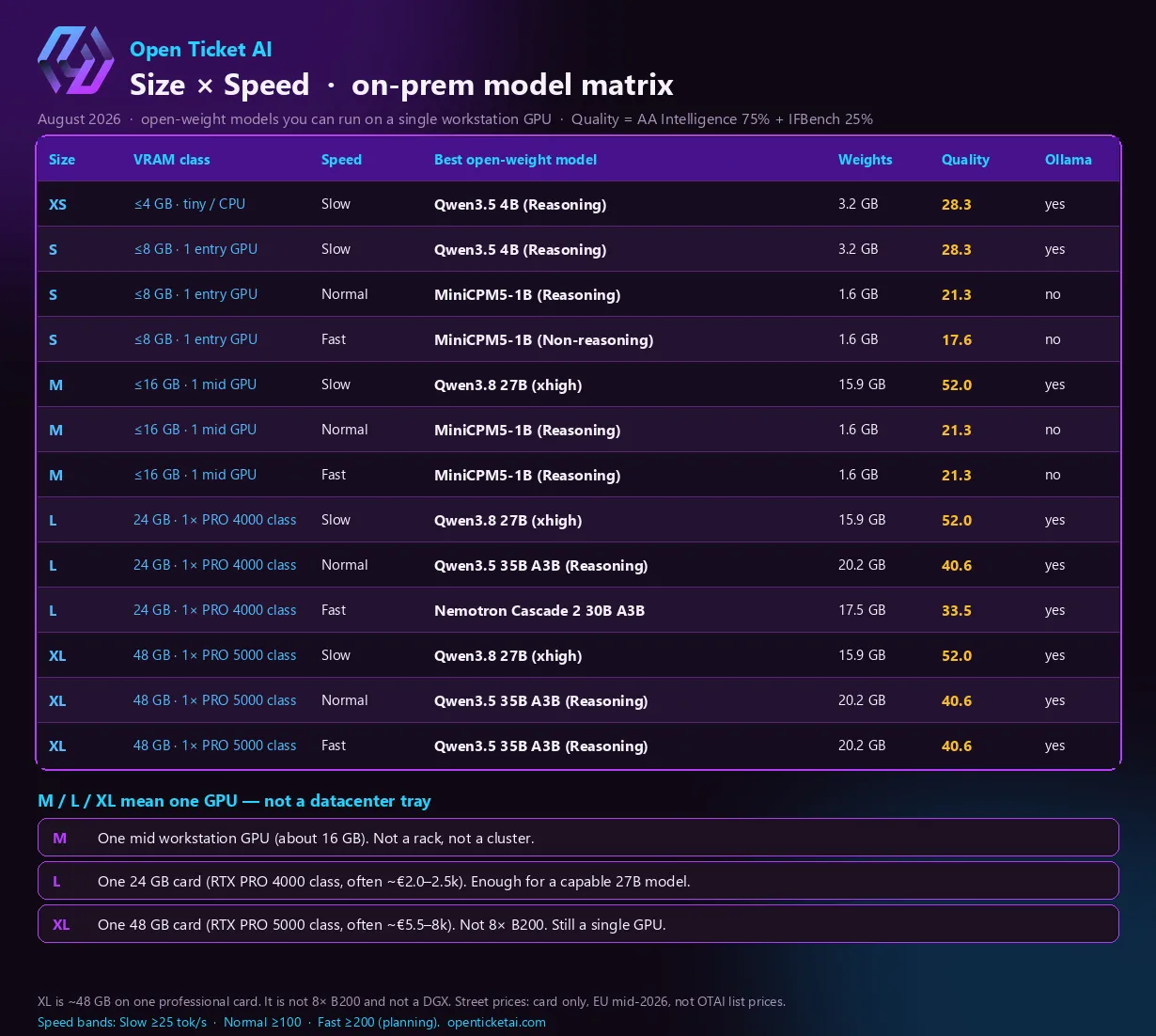
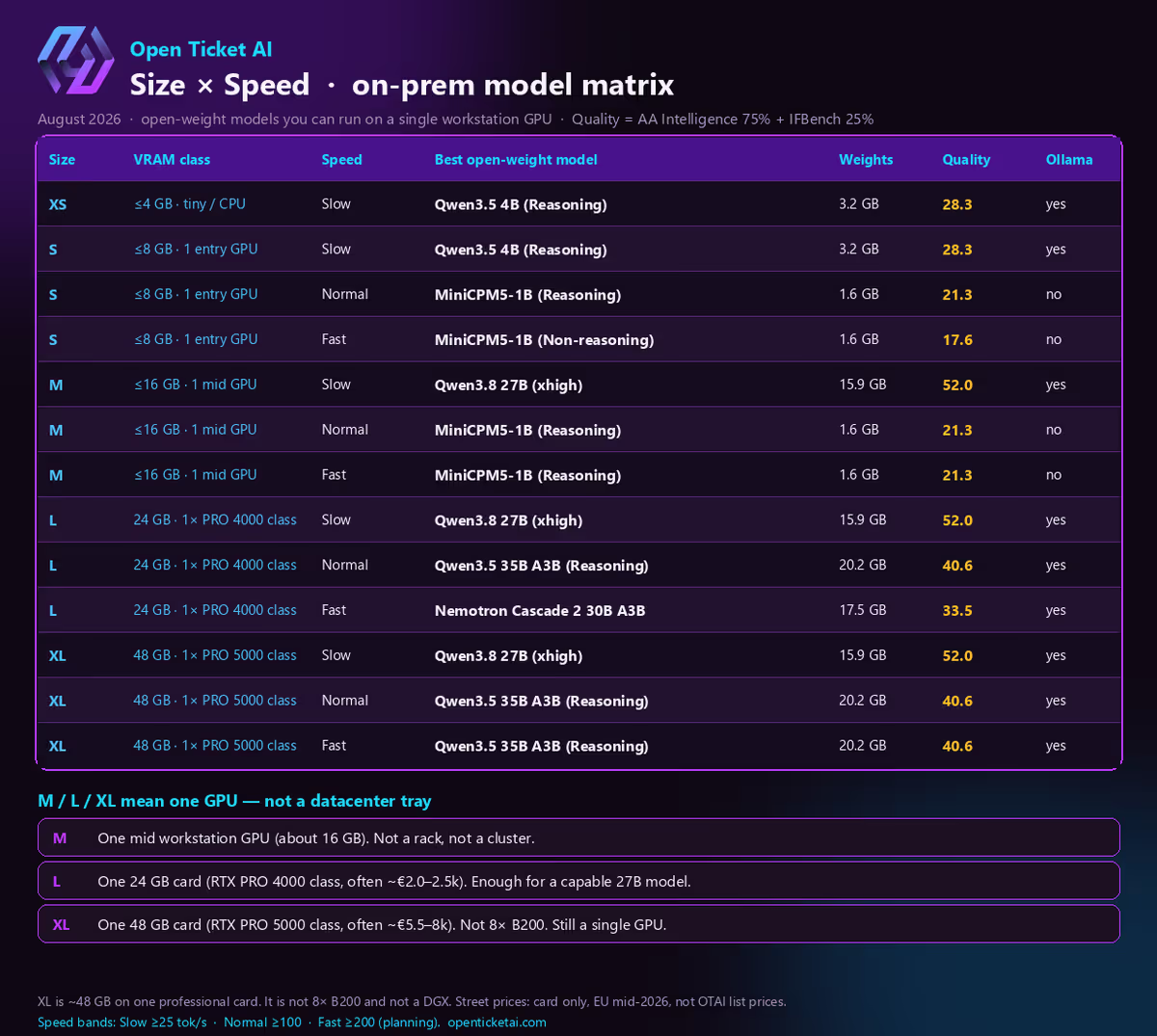
August 2026 snapshot. M, L, and XL are one workstation GPU (about 16 GB, 24 GB, and 48 GB). They are not a rack of B200s.
You do not need a datacenter AI cluster to run useful ticket AI on your own server. In 2026, the models that actually matter for a helpdesk — routing, priority, other structured fields, and summaries — fit on a single professional GPU under your desk or in a 1U host next to OTOBO, Znuny, Zammad, or KIX.
That is the practical implication of the matrix above. The names (Qwen, MiniCPM, Nemotron) are open-weight. You can load them locally. Ticket text stays on your network. Open Ticket AI Full On-Prem is built around that setup; the Free Cloud Trial is only there so you can try the product before you buy a card.
XL in that table is not “8× B200.” It is one ~48 GB workstation GPU. L is one ~24 GB card. M is one mid-size GPU around 16 GB. If you pictured a hyperscale tray, scale the picture down by an order of magnitude — and the invoice with it.
What changed in the last year
A year ago, “serious on-prem” still meant either a hosted API or a cramped 7B/8B local model that struggled with long tickets and strict output formats. Two shifts landed at once.
The models got smaller for the same job. Mixture-of-experts releases (the A3B in names like Qwen3.5 35B A3B) keep a large total parameter count but only activate a few billion weights per token. You get closer to big-model quality at a decode cost closer to a mid-size dense model. Dense 27B-class weights, quantized, now sit comfortably in 24 GB with room for context.
The quality of open weights jumped. Families such as Qwen 3.5 / 3.8 and NVIDIA’s Nemotron line closed much of the gap that used to force teams toward a closed API for “anything that has to follow instructions.” Public composites still are not a ticket-label exam, but they are good enough to say: a local 27B in 2026 is not the local 7B of 2024.
Hardware moved the other way. Workstation Blackwell cards with 24 GB and 48 GB became a normal IT purchase instead of a research special. Flagship 96 GB cards and any B200-class cluster are a different budget — useful for labs, unnecessary for most service desks.
What these models can do on your server
On a helpdesk, the useful jobs are boring and high volume:
| Job | Why a local model is enough | Status in Open Ticket AI |
|---|---|---|
| Classify routing target, priority, type, other single-select fields | Short output, must follow your field list | Available |
| Summarize a thread so the next agent does not reread 40 notes | Needs instruction following, not a 70B essayist | Available |
| Title rewrite / field extraction | Same class of task, tighter formatting | In product; not the headline |
| Customer chatbot / agent reply drafts | Long generations, many people waiting at once | Coming soon |
None of this is “close the ticket by itself.” Humans stay in control. The model fills structured fields and short text so the queue moves.
The August 2026 winners map onto those jobs like this:
- Qwen3.8 27B — the quality pick once you have about 16–24 GB. This is the model class that makes classification and summaries feel like a modern assistant, not a toy.
- Qwen3.5 35B A3B — when you want more throughput on 24–48 GB without jumping to a giant dense model.
- Nemotron Cascade 2 30B A3B — the 24 GB “keep it moving” pick when several jobs run at once.
- Qwen3.5 4B — the honest answer for 4–8 GB: it runs; it will not match 27B quality.
- MiniCPM5-1B — tiny and fast. Use it when concurrency matters more than peak quality, and check that you can actually pull and serve it locally.
Quality in the figure is a public composite (Artificial Analysis Intelligence Index 75% + IFBench 25%). Treat it as a ranking signal, not as “52% of your tickets will be correct.”
Hardware: what M, L, and XL actually cost
Street prices below are GPU cards only, European listings in mid-to-late 2026. They are not Open Ticket AI software prices (Full On-Prem is On Request). A complete node (chassis, CPU, RAM, PSU, extra cooling) costs more; many teams already have a host and only add the card.
| Matrix size | What people hear | What it really is | Typical card class | Card street band (EU) |
|---|---|---|---|---|
| M | “Medium AI box” | One ~16 GB GPU | Mid workstation / last-gen 16 GB | Often well under a 24 GB pro card |
| L | “Large = cluster” | One 24 GB GPU | RTX PRO 4000 Blackwell class | About €2.0–2.5k (recent lows near €2.1k) |
| XL | “XL = 8× B200” | One 48 GB GPU | RTX PRO 5000 Blackwell class | About €5.5–8k depending on shop and VAT |
| (not in this matrix) | “real AI server” | One 96 GB GPU | RTX PRO 6000 Blackwell class | Often €13–16k+ — still one card, still not eight B200s |
A full S-class production node (24 GB card + quiet tower or small 1U) commonly lands in a roughly €4.5–7.5k hardware envelope once you count the host. That is the usual Full On-Prem starting point: classification and summaries for a real desk, on your premises.
B200-class systems are a different market (multi-GPU trays, datacenter power, six-figure conversations). Nothing in this matrix assumes that. If your facilities team heard “XL model catalog” and reserved a cage, you can stand them down.
More sizing narrative: On-Prem Ticket AI: GPU hardware you need and what it really costs.
24 GB is already a capable model — chat is where it hurts
This is the sentence buyers mix up.
On 24 GB (matrix L) you can already run a much more capable model than the 7B generation: Qwen3.8 27B-class weights for quality work, or a MoE 30B-class model when you want more tokens per second. For classification and summaries, a typical helpdesk does not generate long answers. Jobs are short. A handful of tickets in flight at once is normal. One 24 GB card is the right default for that.
A customer chatbot changes the math. Each open chat holds a growing context (the KV cache) and streams tokens until the user is done. Ten people waiting on an answer at the same moment is not “ten classifications.” It is ten long generations sharing one memory pool. That is the scaling problem:
- Quality model + many parallel chats → the 24 GB card fills up or the queue grows.
- Fast tiny model + many chats → the queue moves, answers get thinner.
- More VRAM (48 GB, matrix XL) or a second GPU → more resident context, more concurrent streams — still a single-server story, not a B200 pod.
Until chatbot and reply drafts are the live headline, buy 24 GB for the work that ships today, and treat 48 GB as headroom if you already know portal chat will be busy. Do not buy cluster hardware because the catalog row says XL.
How to use the table without overthinking it
- If you run tickets through structured AI (classify + summarize): plan for L / 24 GB. That is where the capable 27B-class model lives.
- If you only have 8 GB: you can still run locally (4B class). Expect weaker quality. Fine for a lab, thin for production.
- If portal chat will have many people waiting at once: keep the quality model for hard turns, use a smaller/faster model for cheap turns, or step to 48 GB. Measure concurrent waiting users, not open browser tabs.
- Prefer models you can pull today (Ollama “yes” in the figure) for a short pilot.
- Recalibrate on your box. Public scores and planning throughput are not
llama-benchon your quantization and context length.
Evaluate on the Free Cloud Trial, then put Full On-Prem on your GPU when ticket content must stay inside the building.
Sources
- Open Ticket AI models catalog evaluation, snapshot 17 August 2026 — public open-weight ranking for on-prem sizing (not a private ticket exam).
- Artificial Analysis and IFBench — public quality signals used in the figure.
- EU street-price trackers (card only, mid-2026; shops move): RTX PRO 4000, RTX PRO 5000, RTX PRO 6000.
- Ollama library — convenience, not a quality score.
- Adjacent reading: GPU hardware economics, Ollama + Zammad AI, product editions.