
Pharma and Lab Helpdesk in OTAI Studio: Queues, Priorities, and a Customer Chatbot
Set up OTAI Studio for a pharma manufacturer desk: queue and priority Agents, and a customer chatbot for certificates, orders, and complaint intake.

A pharmaceutical manufacturer or development lab runs an internal ticket desk for IT, facilities, quality-document requests, warehouse logistics, and customer complaints. OTAI Studio on the company’s own servers (Full On-Prem) routes that mail and lets a public or customer chatbot answer published support FAQs.
The Agents do not write methods, batch instructions, or lab steps. They do not judge product risk. A qualified person still owns every complaint and every quality ticket, and people still close tickets.
Agents to create
Open Agents. Sync queues and priorities from the ticket system. Descriptions say which desk owns the ticket. Classification is zero-shot from those descriptions. Historical tickets are not used for training.
Queue classification (OTOBO or Znuny). On Zammad, classify Groups. Zammad does not use queues.
| Queue | When it applies |
|---|---|
| Workplace IT | Accounts, devices, login to office systems |
| QA document control | Requests for a published SOP title, a form, or a document number |
| Facilities | Building services, lab-area access doors, utilities tickets |
| Warehouse | Shipment, sample logistics, stock questions that are operational |
| Customer complaints | A product complaint or a certificate request that must be logged |
| Pharmacovigilance intake | Mail that must be registered with that team |
Describe QA document control as “the sender asks for a document that already exists.” Do not paste procedure text into the description. Describe Pharmacovigilance intake as “register this message with that queue.” The Agent only routes it.
Priority classification:
- Highest: users cannot sign in to the quality or ERP system during the workday
- High: a customer complaint that the company already treats as same-day intake
- Normal: a certificate or document request inside the usual time
- Low: a public hours or switchboard question
Minimum confidence: Normal (80%). Below that, human review. Do not use a fallback that closes or accepts a complaint. See Classification agents.
Summarization into a DynamicField for the handoff between intake and QA. The summary restates the request. It is not a deviation record. See Summary agents.
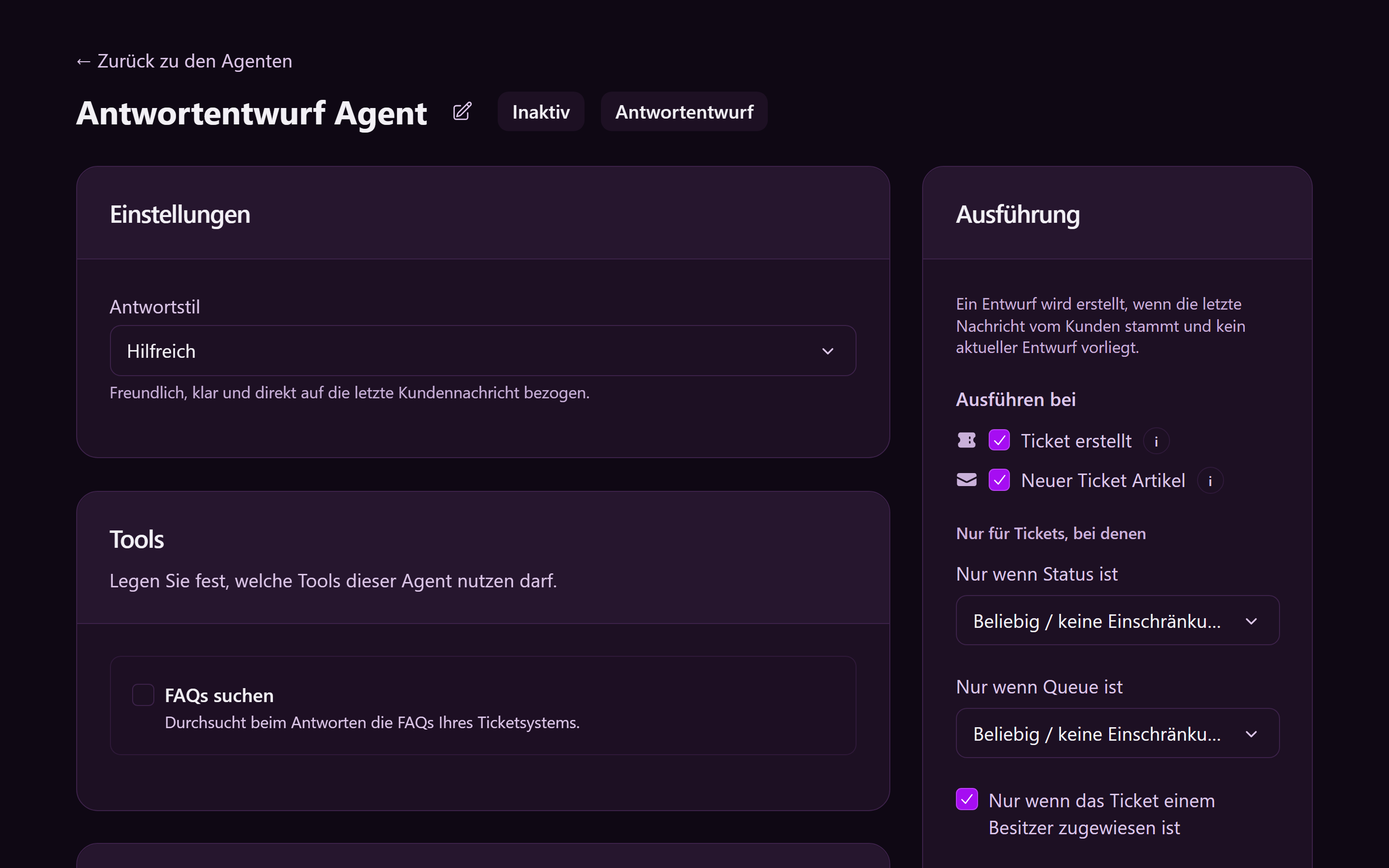
Reply draft for “we logged your complaint / certificate request under this number.” Formal style. Runtime stores the draft. It does not send it and does not close the ticket. See Reply draft agents.
Run conditions
On each ticket Agent, Run conditions:
- Ticket created
- State
new - Target field empty
- Activate
A manufacturing site and a separate lab site, each with its own ticket system, are two Full On-Prem installations. Agents and Chatbots stay separate.
Public and customer chatbots
Chatbots. Articles stay in the ticket-system FAQ. See FAQs.
Public, for visitors who are not signed in. Public FAQs only. Matching source only. Publish non-hazardous support articles:
- How to request a certificate of analysis
- How to report a product complaint (the published channel, what to include: product name, batch if the customer has it, contact)
- Order-status steps that are already public
- Switchboard and office hours
- A line that the chat gives no medical advice, no dosing, and no manufacturing instructions
The public chatbot cannot create a ticket. Point urgent safety reports to the phone number the company already publishes.
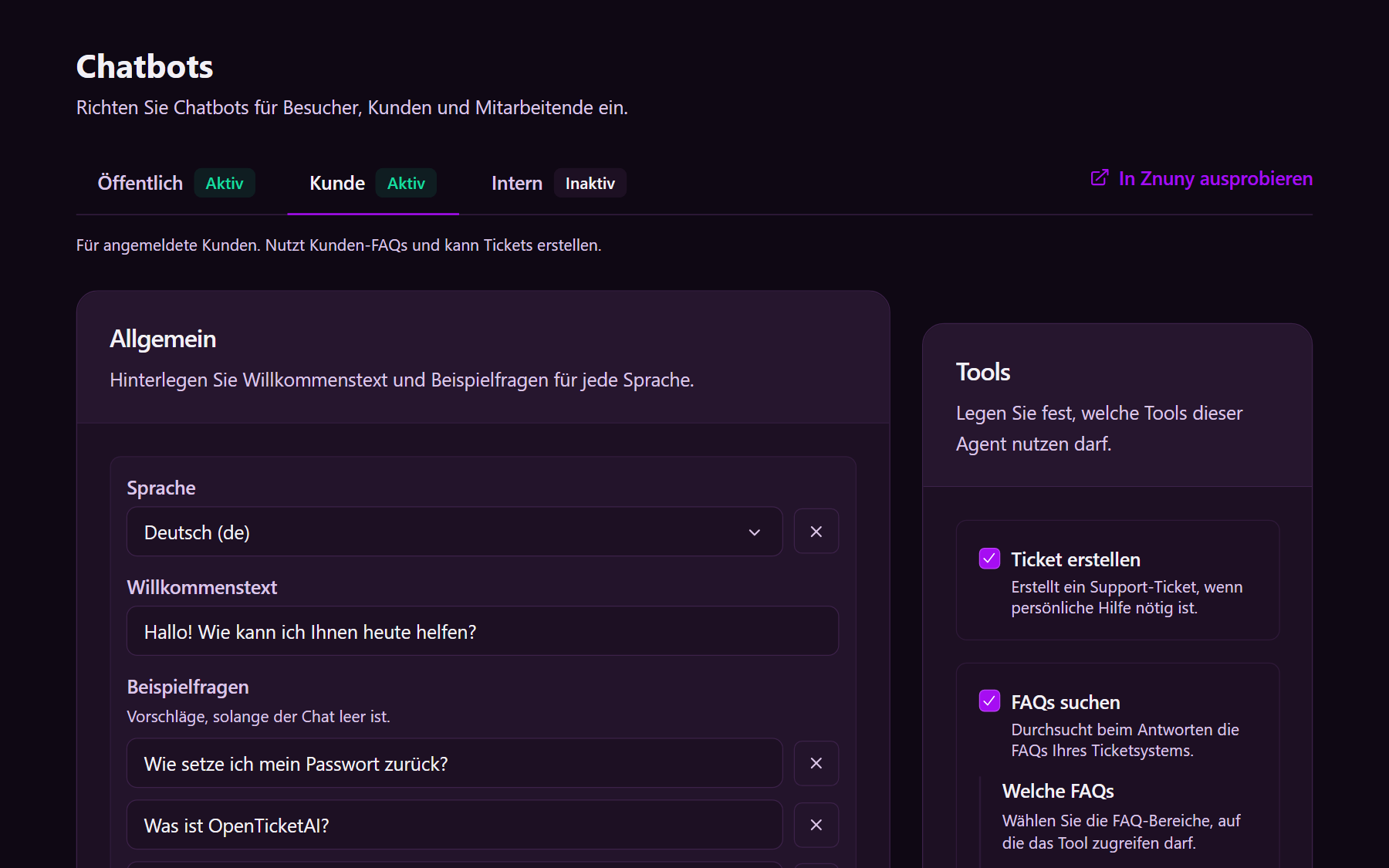
Customer, for signed-in pharmacies, hospitals, or distributors. Search Customer FAQs: order lookup, how to download a certificate, how a complaint number is issued. Allow Create ticket so intake still gets a ticket. See the customer chatbot.
Internal, for staff via AI Chat. Search Internal FAQs that say which queue owns a document request versus a complaint. Keep controlled documents out of chatbot extra knowledge. See the agent chatbot.
A Free Cloud Trial is for evaluation. Production is Full On-Prem. Runtime on the company’s servers runs the Agents and writes queue, priority, and summary back through the OTOBO or Znuny connector.